September 21, 2022
Embedded GDB (+ OpenOCD) with VSCode for RP2040
Background
A few months ago I had the opportunity to switch a project over to GCC/GDB and decided to give setting up VSCode as the visual debugger though GDB a try (again). In the past I hadn’t been able to get this configuration working right, but this time around I was either more persistent or some updates had finally been added to better support an embedded use case.
Since I’m working on a new personal project targeting an ARM, I thought I’d see if I could get it working again and capture the process. This post will describe a configuration targeting the RP2040 and show an example of deploying and debugging one of the example apps provided in the Pico Examples repository remotely through VSCode. The general process I outline here should work for any MCU supported by arm-gcc.
Setup
I put together a basic diagram to show what we’re trying to achieve, and I’ll break down the pieces (and assumptions) in the following sections.
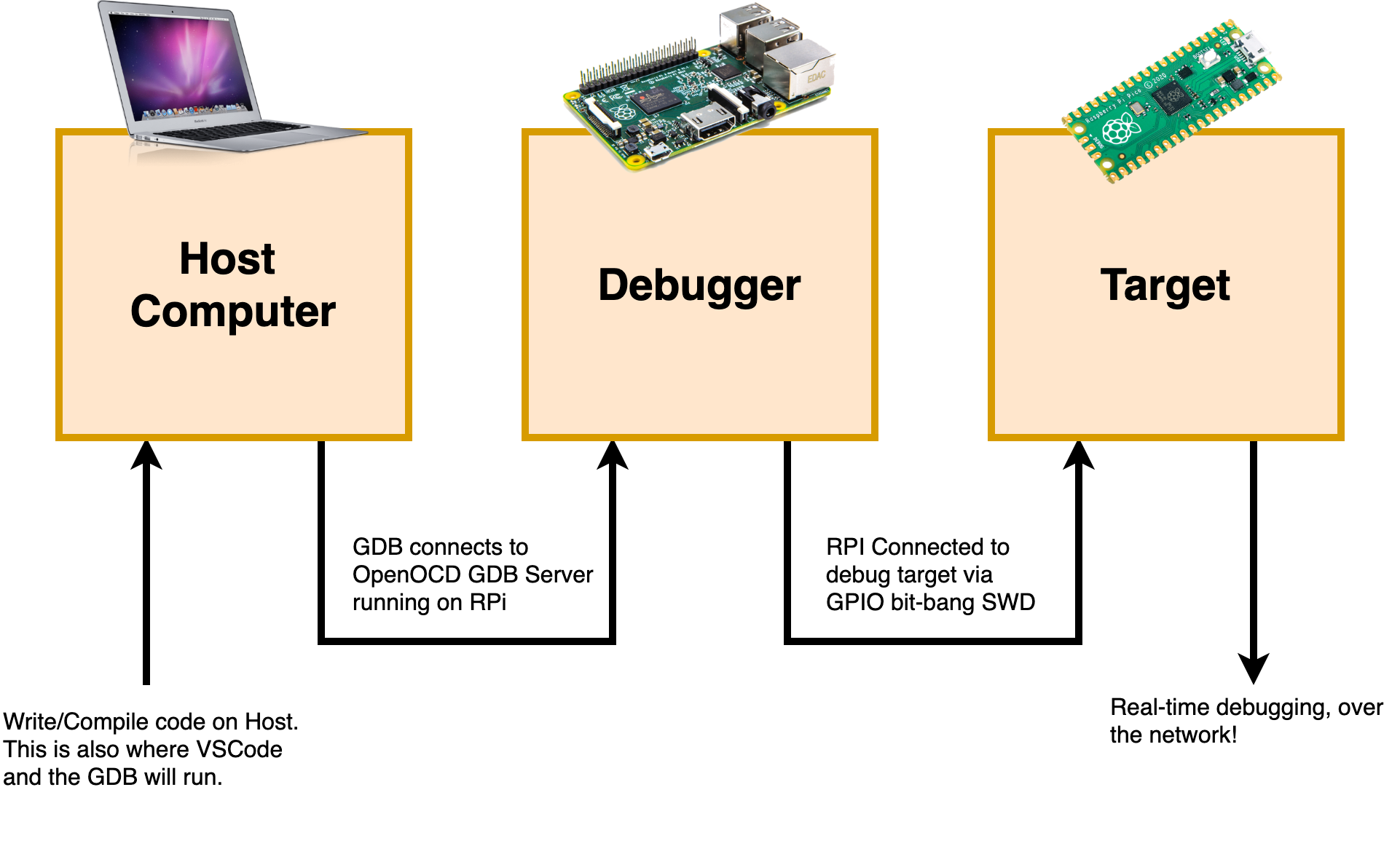
Host Computer
For this blog post, I’ll assume the host has already been setup to build for the RP2040 following the setup guide, found here Getting Started Guide. For my development I’m using an M1 Macbook Air with macOS 12.6. Linux should work seamlessly as well. I’ve had this process working under Windows for different targets, but won’t cover it here. There’s a few extra gotchas, mostly around string handling and paths in some of the configuration files.
VSCode
The Host computer needs VSCode installed, reasonably updated, and configured with the following extensions.
- Version: 1.71.1
- Extensions:
- ms-vscode.cmake-tools
- ms-vscode.cpptools
- ms-vscode.vscode-embedded-tools
- The Embedded Tools extension isn’t strictly required, but it adds some nice additional debugging views once connected to the target.
Debugger
I’ve used the bit-banged GPIO OpenOCD configuration in the past and was excited to see that was a recommended/official configuration for debugging the RP2040. So what’s actually going on here? Instead of using a purpose built (expensive) debugger like a SEGGER J-Link, once can instead use the GPIO pins on a Raspberry PI to connect up to the RP2040’s SWD port. It’s not as robust as a purpose-built debugger, and it’s definitely slower, but the fact that it works (and only costs $5 if you use a Pi Zero W) is pretty incredible.
All we need to get installed on the Raspberry PI is OpenOCD. I would recommend following the steps in the RP2040 setup guide (included below as well) to build the custom/latest version of OpenOCD specifically for the Raspberry Pi. OpenOCD is a great project, but doesn’t always have an official release pre-built for the latest and greatest, so I wouldn’t install from apt.
Run through the following to get OpenOCD installed on the “Debugger Pi”
$ sudo apt install automake autoconf build-essential texinfo libtool libftdi-dev libusb-1.0-0-dev

$ git clone https://github.com/raspberrypi/openocd.git --recursive --branch rp2040 --depth=1
$ cd openocd
$ ./bootstrap
$ ./configure --enable-ftdi --enable-sysfsgpio --enable-bcm2835gpio
$ make -j4
$ sudo make install
After installation if all went well, launching OpenOCD from the Debugger Pi with no arguments should print the following.
pi@raspberrypi:~ $ openocd
Open On-Chip Debugger 0.11.0-g228ede4-dirty (2022-09-21-22:17)
Licensed under GNU GPL v2
For bug reports, read
	http://openocd.org/doc/doxygen/bugs.html
embedded:startup.tcl:26: Error: Can't find openocd.cfg
in procedure 'script'
at file "embedded:startup.tcl", line 26
Info : Listening on port 6666 for tcl connections
Info : Listening on port 4444 for telnet connections
Error: Debug Adapter has to be specified, see "adapter driver" command
embedded:startup.tcl:26: Error:
in procedure 'script'
at file "embedded:startup.tcl", line 26
We’ll come back to this later, after wiring everything up and preparing VSCode.
Wiring
With all the pieces setup, ensure everything is turned off so to hookup the SWD interface. The bare minimum needed is in the table below, just hooking up the SWD pins and a GND. I’m assuming both the RPI and Pico will have their own USB cable for power, but the Pico could be also powered from the RPi if preferred.
| RPi 3/4 Pin | Pico Pin |
|---|---|
| Pin 20 | SWD_GND |
| Pin 18 (GPIO 24) | SWDIO |
| Pin 22 (GPIO 25) | SWCLK |
The RP2040 bring guide has a nice illustration of this, shown below.

Project Configuration
With all the connections in place, get everything powered up and connected. The Raspberry Pi should be connected to the same network or otherwise accessible to the Host’s network.
Build with CMake
Again, assuming the RP2040 getting started guide is being followed, and then folder structure matches what was recommended, open up the pico-examples directory in VSCode to start building examples.
To build the examples using VSCode’s CMake extension, the same defines that are set in the command prompt need to be set in VSCode. Included below is an example settings.json file with the single configuration needed to set the relative location of the pico-sdk repository to the example build directory. This goes in the .vscode folder in the workspace root.
|
|
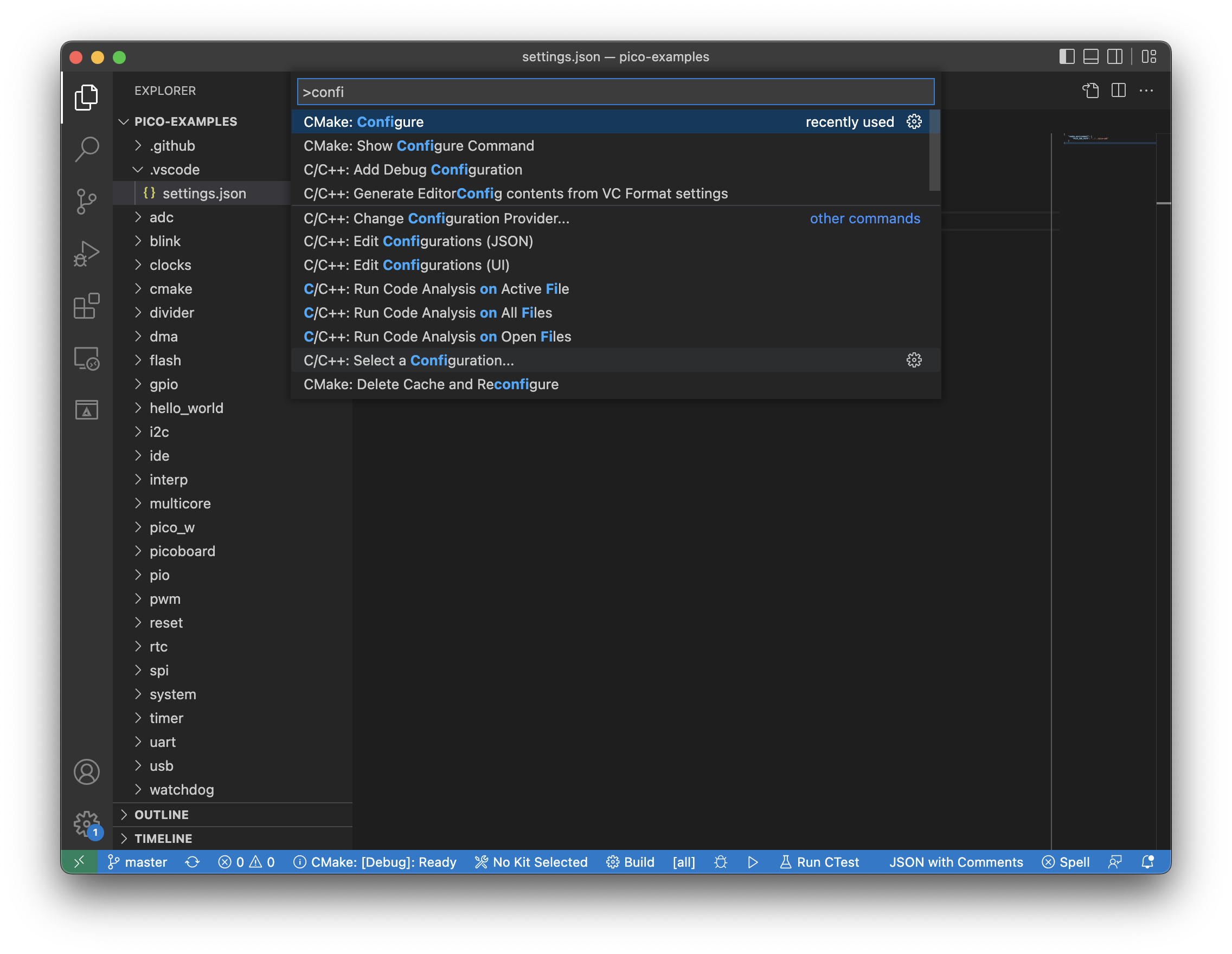
With that file in place, use the VSCode Command Pallette (CMD+Shift+P or CTRL+Shift+P) to configure the CMake project by typing configure and selecting CMake: Configure when it appears as an option in the filter.
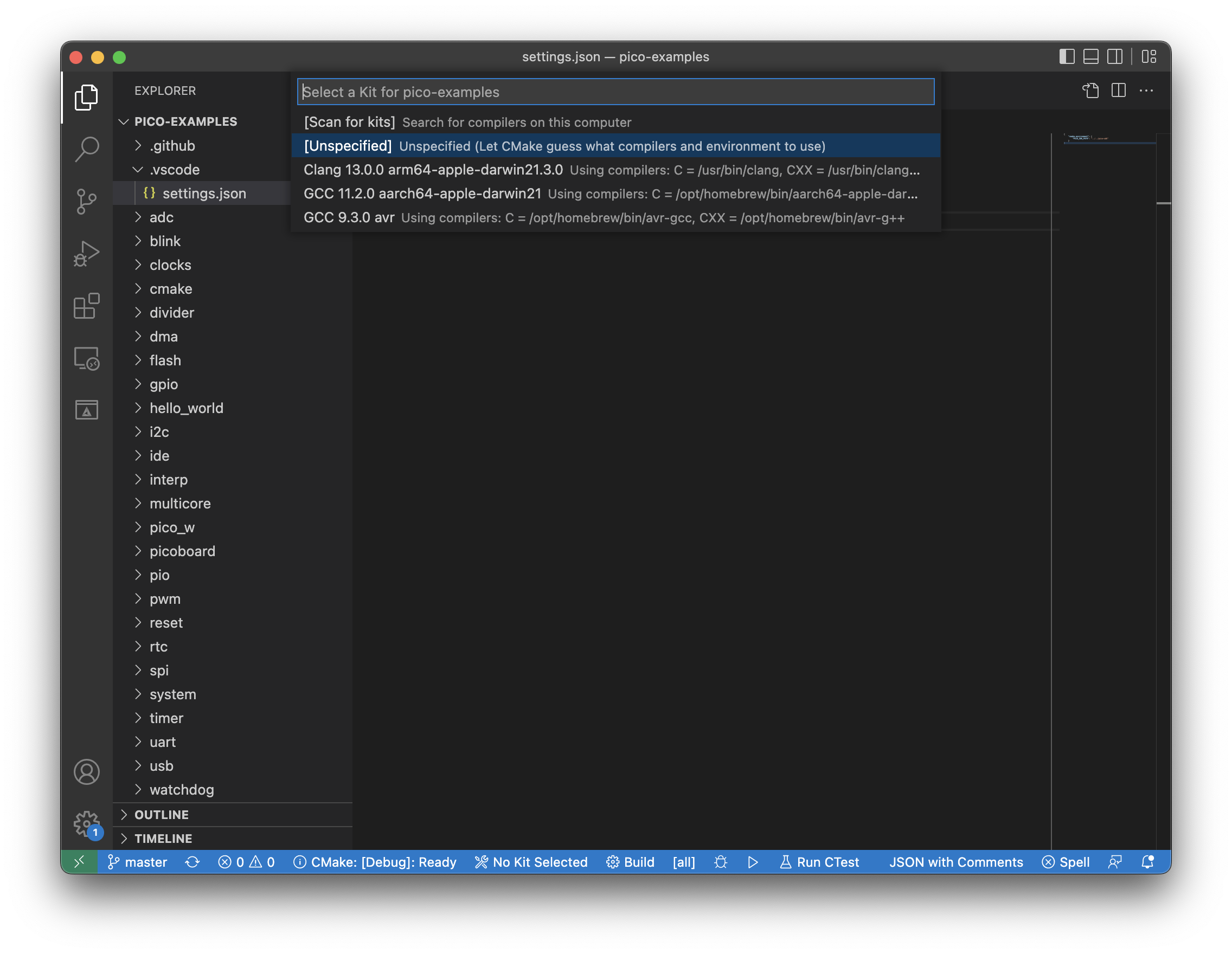
The first time, VSCode should prompt to specify a “Kit” for the build. This refers to a particular installation of build tools (e.g. GCC installed earlier for the RP2040). Because of way CMakeLists.txt is configured in the RP2040 examples projects, the build should automatically select the right build tools. In the example image below, the new arm-gcc build tools installed earlier aren’t even detected by VSCode. So just select Unspecified and let CMake try to detect.
If all goes well, output like the following should be in the VSCode Output: Build/CMake window.
[main] Configuring folder: pico-examples
[proc] Executing command: /opt/homebrew/bin/cmake --no-warn-unused-cli -DCMAKE_EXPORT_COMPILE_COMMANDS:BOOL=TRUE -DCMAKE_BUILD_TYPE:STRING=Debug -S/Users/bjc/Projects/demos/RP2040/pico-examples -B/Users/bjc/Projects/demos/RP2040/pico-examples/build -G "Unix Makefiles"
[cmake] PICO_SDK_PATH is /Users/bjc/Projects/demos/RP2040/pico-sdk
[cmake] PICO platform is rp2040.
[cmake] Not searching for unused variables given on the command line.
[cmake] Build type is Debug
[cmake] Using regular optimized debug build (set PICO_DEOPTIMIZED_DEBUG=1 to de-optimize)
[cmake] PICO target board is pico.
[cmake] Using board configuration from /Users/bjc/Projects/demos/RP2040/pico-sdk/src/boards/include/boards/pico.h
[cmake] TinyUSB available at /Users/bjc/Projects/demos/RP2040/pico-sdk/lib/tinyusb/src/portable/raspberrypi/rp2040; enabling build support for USB.
[cmake] Compiling TinyUSB with CFG_TUSB_DEBUG=1
[cmake] cyw43-driver available at /Users/bjc/Projects/demos/RP2040/pico-sdk/lib/cyw43-driver
[cmake] lwIP available at /Users/bjc/Projects/demos/RP2040/pico-sdk/lib/lwip
[cmake] -- Configuring done
[cmake] -- Generating done
[cmake] -- Build files have been written to: /Users/bjc/Projects/demos/RP2040/pico-examples/build
Now, we can finally build an example! Once again, open the VSCode Command Pallette, and type build. We’re looking for two options CMake: Build and CMake: Build Target.
CMake: Build - Build all outputs specified in CMakeLists.txt CMake: Build Targets - Build only one target specified in CMakeLists.txt.
Both options will work, but I’d suggest using Build Targets and selecting just one example. It actually takes a little while for all of the examples to build (thanks for including so many RPi!).
Once again, my output is included below. This is just building the Blink example project.
[main] Building folder: pico-examples blink
[build] Starting build
[proc] Executing command: /opt/homebrew/bin/cmake --build /Users/bjc/Projects/demos/RP2040/pico-examples/build --config Debug --target blink -j 10 --
[build] Scanning dependencies of target bs2_default
[build] [  0%] Creating directories for 'ELF2UF2Build'
[build] [  0%] Building ASM object pico-sdk/src/rp2_common/boot_stage2/CMakeFiles/bs2_default.dir/compile_time_choice.S.obj
[build] [  0%] No download step for 'ELF2UF2Build'
[build] [  0%] No update step for 'ELF2UF2Build'
[build] [  0%] No patch step for 'ELF2UF2Build'
[build] [  0%] Performing configure step for 'ELF2UF2Build'
[build] [  0%] Linking ASM executable bs2_default.elf
[build] [  0%] Built target bs2_default
[build] [  0%] Generating bs2_default.bin
[build] [  0%] Generating bs2_default_padded_checksummed.S
[build] [  0%] Built target bs2_default_padded_checksummed_asm
[build] -- The C compiler identification is AppleClang 13.1.6.13160021
[build] -- The CXX compiler identification is AppleClang 13.1.6.13160021
[build] -- Detecting C compiler ABI info
[build] -- Detecting C compiler ABI info - done
[build] -- Check for working C compiler: /Library/Developer/CommandLineTools/usr/bin/cc - skipped
[build] -- Detecting C compile features
[build] -- Detecting C compile features - done
[build] -- Detecting CXX compiler ABI info
[build] -- Detecting CXX compiler ABI info - done
[build] -- Check for working CXX compiler: /Library/Developer/CommandLineTools/usr/bin/c++ - skipped
[build] -- Detecting CXX compile features
[build] -- Detecting CXX compile features - done
[build] -- Configuring done
[build] -- Generating done
[build] -- Build files have been written to: /Users/bjc/Projects/demos/RP2040/pico-examples/build/elf2uf2
[build] [  0%] Performing build step for 'ELF2UF2Build'
[build] [ 50%] Building CXX object CMakeFiles/elf2uf2.dir/main.cpp.o
[build] [100%] Linking CXX executable elf2uf2
[build] [100%] Built target elf2uf2
[build] [  0%] No install step for 'ELF2UF2Build'
[build] [  0%] Completed 'ELF2UF2Build'
[build] [  0%] Built target ELF2UF2Build
[build] Scanning dependencies of target blink
[build] [  0%] Building C object blink/CMakeFiles/blink.dir/blink.c.obj
[build] [  0%] Building C object blink/CMakeFiles/blink.dir/Users/bjc/Projects/demos/RP2040/pico-sdk/src/rp2_common/hardware_gpio/gpio.c.obj
[build] [100%] Building C object blink/CMakeFiles/blink.dir/Users/bjc/Projects/demos/RP2040/pico-sdk/src/rp2_common/pico_platform/platform.c.obj
[build] [100%] Building C object blink/CMakeFiles/blink.dir/Users/bjc/Projects/demos/RP2040/pico-sdk/src/rp2_common/pico_stdlib/stdlib.c.obj
[build] [100%] Building ASM object blink/CMakeFiles/blink.dir/Users/bjc/Projects/demos/RP2040/pico-sdk/src/rp2_common/hardware_irq/irq_handler_chain.S.obj
[build] [100%] Building C object blink/CMakeFiles/blink.dir/Users/bjc/Projects/demos/RP2040/pico-sdk/src/rp2_common/hardware_claim/claim.c.obj
[build] [100%] Building C object blink/CMakeFiles/blink.dir/Users/bjc/Projects/demos/RP2040/pico-sdk/src/rp2_common/hardware_sync/sync.c.obj
[build] [100%] Building C object blink/CMakeFiles/blink.dir/Users/bjc/Projects/demos/RP2040/pico-sdk/src/rp2_common/hardware_irq/irq.c.obj
[build] [100%] Building C object blink/CMakeFiles/blink.dir/Users/bjc/Projects/demos/RP2040/pico-sdk/src/common/pico_sync/lock_core.c.obj
[build] [100%] Building C object blink/CMakeFiles/blink.dir/Users/bjc/Projects/demos/RP2040/pico-sdk/src/common/pico_sync/sem.c.obj
[build] [100%] Building C object blink/CMakeFiles/blink.dir/Users/bjc/Projects/demos/RP2040/pico-sdk/src/common/pico_time/time.c.obj
[build] [100%] Building C object blink/CMakeFiles/blink.dir/Users/bjc/Projects/demos/RP2040/pico-sdk/src/common/pico_time/timeout_helper.c.obj
[build] [100%] Building C object blink/CMakeFiles/blink.dir/Users/bjc/Projects/demos/RP2040/pico-sdk/src/rp2_common/hardware_timer/timer.c.obj
[build] [100%] Building C object blink/CMakeFiles/blink.dir/Users/bjc/Projects/demos/RP2040/pico-sdk/src/common/pico_util/datetime.c.obj
[build] [100%] Building C object blink/CMakeFiles/blink.dir/Users/bjc/Projects/demos/RP2040/pico-sdk/src/common/pico_util/pheap.c.obj
[build] [100%] Building C object blink/CMakeFiles/blink.dir/Users/bjc/Projects/demos/RP2040/pico-sdk/src/common/pico_util/queue.c.obj
[build] [100%] Building C object blink/CMakeFiles/blink.dir/Users/bjc/Projects/demos/RP2040/pico-sdk/src/common/pico_sync/mutex.c.obj
[build] [100%] Building C object blink/CMakeFiles/blink.dir/Users/bjc/Projects/demos/RP2040/pico-sdk/src/common/pico_sync/critical_section.c.obj
[build] [100%] Building C object blink/CMakeFiles/blink.dir/Users/bjc/Projects/demos/RP2040/pico-sdk/src/rp2_common/hardware_uart/uart.c.obj
[build] [100%] Building ASM object blink/CMakeFiles/blink.dir/Users/bjc/Projects/demos/RP2040/pico-sdk/src/rp2_common/hardware_divider/divider.S.obj
[build] [100%] Building C object blink/CMakeFiles/blink.dir/Users/bjc/Projects/demos/RP2040/pico-sdk/src/rp2_common/pico_runtime/runtime.c.obj
[build] [100%] Building C object blink/CMakeFiles/blink.dir/Users/bjc/Projects/demos/RP2040/pico-sdk/src/rp2_common/hardware_clocks/clocks.c.obj
[build] [100%] Building C object blink/CMakeFiles/blink.dir/Users/bjc/Projects/demos/RP2040/pico-sdk/src/rp2_common/hardware_pll/pll.c.obj
[build] [100%] Building C object blink/CMakeFiles/blink.dir/Users/bjc/Projects/demos/RP2040/pico-sdk/src/rp2_common/hardware_watchdog/watchdog.c.obj
[build] [100%] Building C object blink/CMakeFiles/blink.dir/Users/bjc/Projects/demos/RP2040/pico-sdk/src/rp2_common/hardware_xosc/xosc.c.obj
[build] [100%] Building C object blink/CMakeFiles/blink.dir/Users/bjc/Projects/demos/RP2040/pico-sdk/src/rp2_common/hardware_vreg/vreg.c.obj
[build] [100%] Building C object blink/CMakeFiles/blink.dir/Users/bjc/Projects/demos/RP2040/pico-sdk/src/rp2_common/pico_printf/printf.c.obj
[build] [100%] Building ASM object blink/CMakeFiles/blink.dir/Users/bjc/Projects/demos/RP2040/pico-sdk/src/rp2_common/pico_bit_ops/bit_ops_aeabi.S.obj
[build] [100%] Building C object blink/CMakeFiles/blink.dir/Users/bjc/Projects/demos/RP2040/pico-sdk/src/rp2_common/pico_bootrom/bootrom.c.obj
[build] [100%] Building ASM object blink/CMakeFiles/blink.dir/Users/bjc/Projects/demos/RP2040/pico-sdk/src/rp2_common/pico_divider/divider.S.obj
[build] [100%] Building C object blink/CMakeFiles/blink.dir/Users/bjc/Projects/demos/RP2040/pico-sdk/src/rp2_common/pico_double/double_init_rom.c.obj
[build] [100%] Building ASM object blink/CMakeFiles/blink.dir/Users/bjc/Projects/demos/RP2040/pico-sdk/src/rp2_common/pico_double/double_aeabi.S.obj
[build] [100%] Building C object blink/CMakeFiles/blink.dir/Users/bjc/Projects/demos/RP2040/pico-sdk/src/rp2_common/pico_double/double_math.c.obj
[build] [100%] Building ASM object blink/CMakeFiles/blink.dir/Users/bjc/Projects/demos/RP2040/pico-sdk/src/rp2_common/pico_int64_ops/pico_int64_ops_aeabi.S.obj
[build] [100%] Building ASM object blink/CMakeFiles/blink.dir/Users/bjc/Projects/demos/RP2040/pico-sdk/src/rp2_common/pico_double/double_v1_rom_shim.S.obj
[build] [100%] Building ASM object blink/CMakeFiles/blink.dir/Users/bjc/Projects/demos/RP2040/pico-sdk/src/rp2_common/pico_float/float_aeabi.S.obj
[build] [100%] Building C object blink/CMakeFiles/blink.dir/Users/bjc/Projects/demos/RP2040/pico-sdk/src/rp2_common/pico_float/float_init_rom.c.obj
[build] [100%] Building C object blink/CMakeFiles/blink.dir/Users/bjc/Projects/demos/RP2040/pico-sdk/src/rp2_common/pico_float/float_math.c.obj
[build] [100%] Building ASM object blink/CMakeFiles/blink.dir/Users/bjc/Projects/demos/RP2040/pico-sdk/src/rp2_common/pico_float/float_v1_rom_shim.S.obj
[build] [100%] Building C object blink/CMakeFiles/blink.dir/Users/bjc/Projects/demos/RP2040/pico-sdk/src/rp2_common/pico_malloc/pico_malloc.c.obj
[build] [100%] Building ASM object blink/CMakeFiles/blink.dir/Users/bjc/Projects/demos/RP2040/pico-sdk/src/rp2_common/pico_mem_ops/mem_ops_aeabi.S.obj
[build] [100%] Building ASM object blink/CMakeFiles/blink.dir/Users/bjc/Projects/demos/RP2040/pico-sdk/src/rp2_common/pico_standard_link/crt0.S.obj
[build] [100%] Building CXX object blink/CMakeFiles/blink.dir/Users/bjc/Projects/demos/RP2040/pico-sdk/src/rp2_common/pico_standard_link/new_delete.cpp.obj
[build] [100%] Building C object blink/CMakeFiles/blink.dir/Users/bjc/Projects/demos/RP2040/pico-sdk/src/rp2_common/pico_standard_link/binary_info.c.obj
[build] [100%] Building C object blink/CMakeFiles/blink.dir/Users/bjc/Projects/demos/RP2040/pico-sdk/src/rp2_common/pico_stdio/stdio.c.obj
[build] [100%] Building C object blink/CMakeFiles/blink.dir/Users/bjc/Projects/demos/RP2040/pico-sdk/src/rp2_common/pico_stdio_uart/stdio_uart.c.obj
[build] [100%] Linking CXX executable blink.elf
[build] /Applications/ArmGNUToolchain/11.3.rel1/arm-none-eabi/bin/../lib/gcc/arm-none-eabi/11.3.1/../../../../arm-none-eabi/bin/ld: /Applications/ArmGNUToolchain/11.3.rel1/arm-none-eabi/bin/../lib/gcc/arm-none-eabi/11.3.1/../../../../arm-none-eabi/lib/thumb/v6-m/nofp/libg.a(libc_a-closer.o): in function `_close_r':
[build] /Volumes/data/jenkins/workspace/GNU-toolchain/arm-11/src/newlib-cygwin/newlib/libc/reent/closer.c:47: warning: _close is not implemented and will always fail
[build] /Applications/ArmGNUToolchain/11.3.rel1/arm-none-eabi/bin/../lib/gcc/arm-none-eabi/11.3.1/../../../../arm-none-eabi/bin/ld: /Applications/ArmGNUToolchain/11.3.rel1/arm-none-eabi/bin/../lib/gcc/arm-none-eabi/11.3.1/../../../../arm-none-eabi/lib/thumb/v6-m/nofp/libg.a(libc_a-lseekr.o): in function `_lseek_r':
[build] /Volumes/data/jenkins/workspace/GNU-toolchain/arm-11/src/newlib-cygwin/newlib/libc/reent/lseekr.c:49: warning: _lseek is not implemented and will always fail
[build] [100%] Built target blink
[build] Build finished with exit code 0
If all went well, there should now be a file blink.elf in pico_examples/build/blink.
VSCode GDB Debug
Similar to setting up CMake, we need to add a file to the .vscode folder in the workspace. This time, we need to add a launch.json file, which describes a particular (or multiple) debug configurations. Example file to launch the blink.elf application we just built below.
|
|
The only thing that needs to be filled in is the address of the RPi we built OpenOCD on earlier. VSCode will connect to the remote OpenOCD process’s GDB server, push the binary just built, and start debugging.
Now, going to the Run menu, and selecting Start Debugging (or press F5) will start the debug session. That said, we haven’t started OpenOCD yet on the RPi, so it won’t quite work.
Debug
After all that, we just have to launch OpenOCD on the RaspberryPI connected to the RP2040’s SWD port. Going back to the SSH prompt, go ahead and run:
$ openocd -f interface/raspberrypi-swd.cfg -f target/rp2040.cfg -c "bindto 0.0.0.0"
We’re passing OpenOCD two configuration files with -f, one will allow us to use the RPI’s GPIO a the debug interface, the other specifies the target as an RP2040. The -c argument specifies that OpenOCD should “bind to all interfaces”, allowing the VSCode instance on the Host to connect to the GDB server which will be opened on the RPi.
If it worked, the output will look similar to below, and indicate that OpenOCD is now listening on port 3333, what VSCode was just configured to connect to.
pi@raspberrypi:~ $ openocd -f interface/raspberrypi-swd.cfg -f target/rp2040.cfg -c "bindto 0.0.0.0"
Open On-Chip Debugger 0.11.0-g228ede4-dirty (2022-09-21-22:17)
Licensed under GNU GPL v2
For bug reports, read
	http://openocd.org/doc/doxygen/bugs.html
adapter speed: 1000 kHz

Info : Hardware thread awareness created
Info : Hardware thread awareness created
Info : RP2040 Flash Bank Command
Info : Listening on port 6666 for tcl connections
Info : Listening on port 4444 for telnet connections
Info : BCM2835 GPIO JTAG/SWD bitbang driver
Info : clock speed 1001 kHz
Info : SWD DPIDR 0x0bc12477
Info : SWD DLPIDR 0x00000001
Info : SWD DPIDR 0x0bc12477
Info : SWD DLPIDR 0x10000001
Info : rp2040.core0: hardware has 4 breakpoints, 2 watchpoints
Info : rp2040.core1: hardware has 4 breakpoints, 2 watchpoints
Info : starting gdb server for rp2040.core0 on 3333
Info : Listening on port 3333 for gdb connections
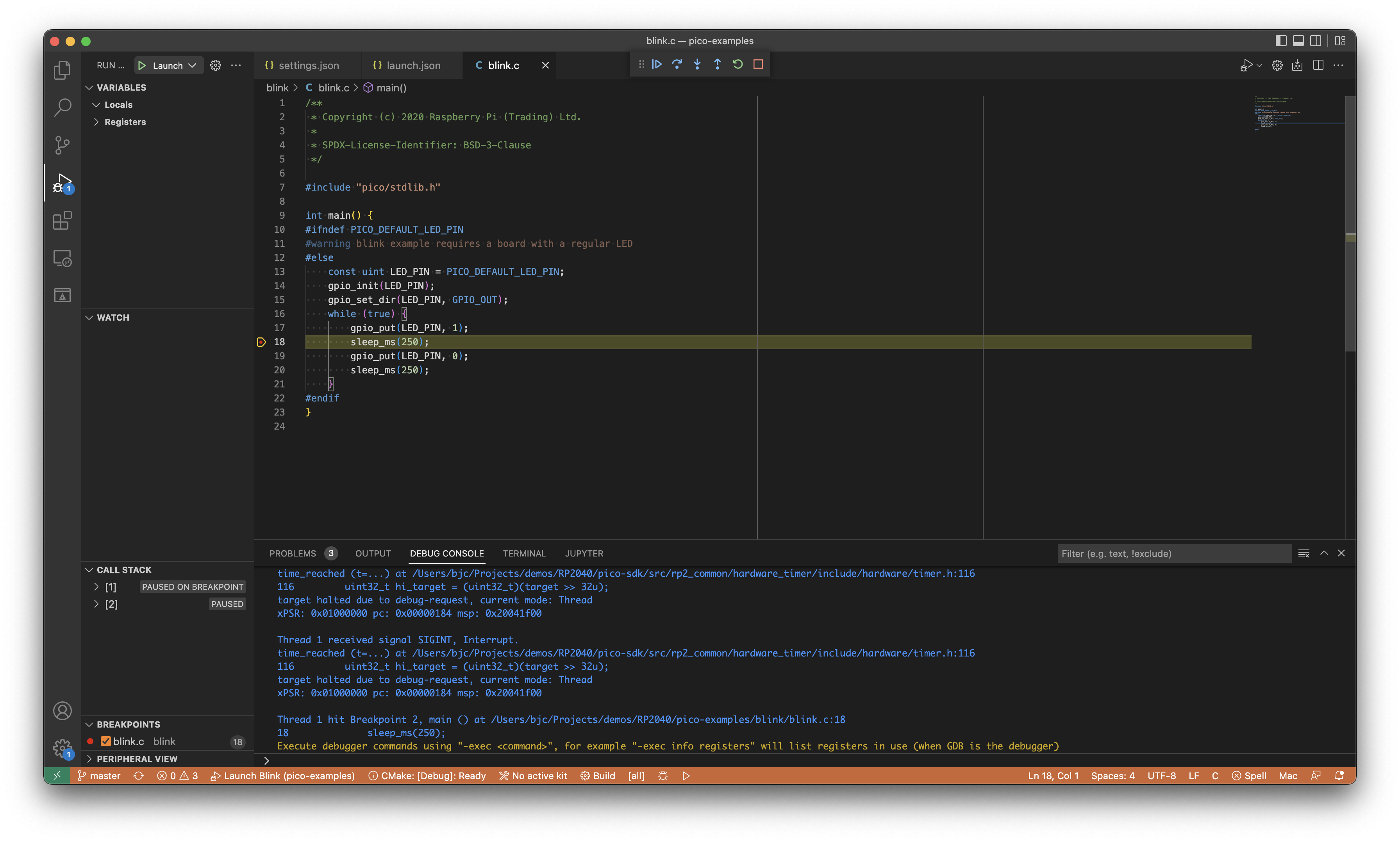
Now, going back to VScode and starting a debug session as before will connect, push the code, and start debugging!
Putting a breakpoint somewhere in the blink.c file will halt execution, just as it should.